Howto develop SQL procedures faster

If you are working on some SQL project, making SQL dump more readable is very useful. You need to optimize edit-import-try-fix-export loop, because you want develop your SQL procedures fast. Here are some tips how to accomplish this.
Configure your mysql client
Set parameter comments = 1 in your ~/.my.cnf, which will preserve comments in your SQL procedures.
Make SQL dumps more readable
Dump your procedures with the following command
mysqldump --no-data \
  --skip-dump-date --skip-comments --skip-set-charset \
  --routines --no-create-info --skip-triggers $DATABASE \
    | grep -v -e '^/\*\![0-9]* SET ' \
    > sql/proceures.sql
Use ‘make’ to import/export easily
Create Makefile (look here for example) and use simple comands
and
Use Vim editor to fold body of the procedure
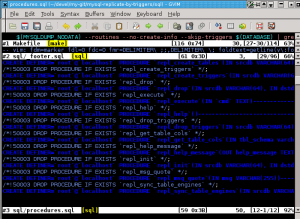
Vim editor has a great feature - folding. You can hide parts of edited file and get better overview of your source code. But little configuration is required for .sql file. Add the following line at the end of your .sql file:
$ cat sql/_footer.sql
-- vim: fdm=marker fdl=0 fdc=0 fmr=DELIMITER\ ;;,DELIMITER\ \; foldtext=getline(v\:foldstart\+1)
Use Vim autocommand
In Vim editor use command
which will use make to install your SQL procedures after each write of *.sql file. Command is executed directly from editor so you don’t need to stop or suspend them.