Shorewall - filtering IMAP/SMTP access to gmail.com domain
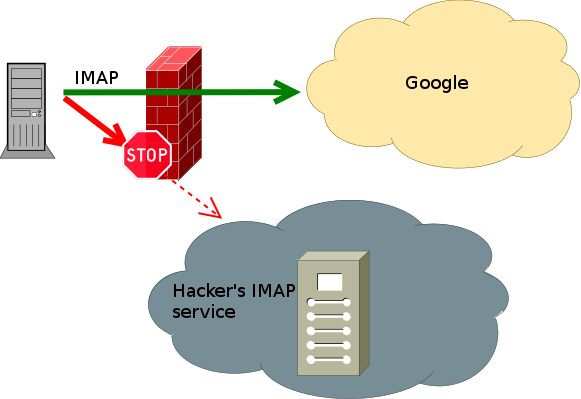
Do you need to discover what IP netblocks are owned and operated by Google to perhaps add to your firewall ACLs? With dynamic zones available in Shorewall, you are able to define firewall rules and to filter network traffic based on the domain name. For example, you can permit IMAPS connection only to gmail.com domain. Problem is that Google cluster is very big and you are always connecting to different IP address. So you can’t define static rules for traffic filtering. Here is little HOWTO do this.
First install the following Debian packages:
Google provides useful way how to retrieve Google’s network ranges. You can discover Google’s netblocks by retrieving following DNS records. Use dig tool to do this (retrieve also _netblocks2 and _netblock3 too):
# dig +short TXT _spf.google.com
"v=spf1 include:_netblocks.google.com include:_netblocks2.google.com include:_netblocks3.google.com ~all"
# dig IN TXT _netblocks.google.com
; <<>> DiG 9.9.5-2-Debian <<>> IN TXT _netblocks.google.com
;; global options: +cmd
;; Got answer:
;; ->>HEADER<_netblocks.google.com.  2846    IN      TXT     "v=spf1 ip4:216.239.32.0/19 ip4:64.233.160.0/19 ip4:66.249.80.0/20 ip4:72.14.192.0/18 ip4:209.85.128.0/17 ip4:66.102.0.0/20 ip4:74.125.0.0/16 ip4:64.18.0.0/20 ip4:207.126.144.0/20 ip4:173.194.0.0/16 ~all"

;; Query time: 0 msec
;; SERVER: 10.0.0.1#53(10.0.0.1)
;; WHEN: Wed Mar 25 12:05:02 CET 2014
;; MSG SIZE  rcvd: 254
Extracting IP ranges from dig’s output is easy:
So let’s create script for extraction (we need to extract IPv6 ranges too). Extracted ranges will be added to kernel’s ipset tables and we can use those tables in shorewall configuration.
Checklist
- create ipset tables on shorewall startup - modify /etc/default/shorewall config
- create script /etc/shorewall/gmail-ipset-update.sh
- configure shorewall
- schedule periodic update of ipsets
Configure shorewall
Add the following lines to /etc/default/shorewall so we can create ipsets before shorewall starts. Because we are not using dig here, no network is requered for successfull DNS record retrieval. On server startup network is not fully configured yet.
IPSET4='gm4il'
IPSET4_NEW='gm4il_new'
IPSET6='gm6il'
IPSET6_NEW='gm6il_new'

# create ipsets if they doesn't exists
ipset -exist create "$IPSET4" hash:net family inet
ipset -exist create "$IPSET6" hash:net family inet6
I’m using
SAVE_IPSETS=Yes
parameter in /etc/shorewall/shorewall.conf too. Now configure shorewall’s zones, hosts and rules:
echo "gm4il:net  ipv4    dynamic_shared" >> /etc/shorewall/zones
echo "gm4il      eth0:dynamic"           >> /etc/shorewall/hosts
echo "ACCEPT   fw   gm4il   tcp     993" >> /etc/shorewall/rules
Please, restart your shorewall configuration now. I’m using the following shell combo-command:
Hoping everything is OK with your shorewall setup we continue with ipset configuration.
Create script /etc/shorewall/gmail-ipset-update.sh
Create script bellow, and grant execute permission to this script, and schedule an automatic execution using cron:
#!/bin/sh

#
# gmail-ipset-update.sh
#
# Developed by Lubomir Host <lubomir.host@gmail.com>
# Copyright (c) 2014
# Licensed under terms of GNU General Public License.
# All rights reserved.
#
# Changelog:
# 2014-03-26 - created
#
# Crontab schedule:
# */5 * * * * /etc/shorewall/gmail-ipset-update.sh > /dev/null
#

if [ -f /etc/default/shorewall ]; then
    . /etc/default/shorewall
fi

DEBUG=: # debug off
#DEBUG=echo # debug on

# "v=spf1 include:_netblocks.google.com include:_netblocks2.google.com include:_netblocks3.google.com ~all"
NETBLOCKS="`dig +short TXT _spf.google.com | awk -v RS=' ' -v FS='include:' '/^include:/ { print $2; }'`"

# create ipsets if they doesn't exists
ipset -exist create "$IPSET4" hash:net family inet
ipset -exist create "$IPSET6" hash:net family inet6

ipset -exist create "$IPSET4_NEW" hash:net family inet
ipset -exist create "$IPSET6_NEW" hash:net family inet6

# list IP ranges for gmail.com - IPv4
for net in `dig +short IN TXT $NETBLOCKS \
    | awk -v RS=" " -v FS=":" '/^ip4:/ { print $2; }' `; do
    $DEBUG "Adding network $net"
    ipset add "$IPSET4_NEW" "$net"
done

# list IP ranges for gmail.com - IPv6
for net in `dig +short IN TXT $NETBLOCKS \
    | awk -v RS=" " -v FS="ip6:" '/^ip6:/ { print $2; }' `; do
    $DEBUG "Adding network $net"
    ipset add "$IPSET6_NEW" "$net"
done

ipset swap "$IPSET4_NEW" "$IPSET4"
ipset swap "$IPSET6_NEW" "$IPSET6"

# cleanup
ipset destroy "$IPSET4_NEW"
ipset destroy "$IPSET6_NEW"
If you are reading here, you should have ipset tables successfully configured and shorewall is configured too. So you can try to connect to your gmail account from your favorite e-mail client. In case of some problem, you will see error message in dmesg:
[192097.956779] Shorewall:fw2net:REJECT:IN= OUT=eth0 SRC=10.0.0.2 DST=173.194.65.108 LEN=60 TOS=0x00 PREC=0x00 TTL=64 ID=19794 DF PROTO=TCP SPT=52537 DPT=993 WINDOW=29200 RES=0x00 SYN URGP=0
[192097.956860] Shorewall:fw2net:REJECT:IN= OUT=eth0 SRC=10.0.0.2 DST=173.194.65.109 LEN=60 TOS=0x00 PREC=0x00 TTL=64 ID=49917 DF PROTO=TCP SPT=58540 DPT=993 WINDOW=29200 RES=0x00 SYN URGP=0
Resulting IPSETS are as follows:
# ipset list
Name: gm4il
Type: hash:net
Revision: 4
Header: family inet hashsize 1024 maxelem 65536
Size in memory: 17080
References: 8
Members:
66.102.0.0/20
216.239.32.0/19
64.233.160.0/19
173.194.0.0/16
209.85.128.0/17
207.126.144.0/20
74.125.0.0/16
72.14.192.0/18
66.249.80.0/20
64.18.0.0/20

Name: gm6il
Type: hash:net
Revision: 4
Header: family inet6 hashsize 1024 maxelem 65536
Size in memory: 18008
References: 0
Members:
2404:6800:4000::/36
2800:3f0:4000::/36
2a00:1450:4000::/36
2607:f8b0:4000::/36
2c0f:fb50:4000::/36
2001:4860:4000::/36
And here are resulting iptables rules:
# iptables-save| grep -e 'fw2gm[46]il'
:fw2gm4il - [0:0]
-A eth0_out -m set --match-set gm4il dst -j fw2gm4il
-A fw2gm4il -m conntrack --ctstate RELATED,ESTABLISHED -j ACCEPT
-A fw2gm4il -p tcp -m tcp --dport 993 -j ACCEPT
-A fw2gm4il -j Reject
-A fw2gm4il -j LOG --log-prefix "Shorewall:fw2gm4il:REJECT:" --log-level 6
-A fw2gm4il -g reject
For IPv6 use the command
Enjoy your complicated firewall setup! :-)